If you are watching Super Bowl LX 2026 with contacts, a long game can turn into dry, scratchy, blurry minutes fast, especially if you are switching between screens, snacks, and crowded spaces. These Super Bowl 2026 contact lens tips focus on comfort and safety, with a simple checklist, what to pack, and what to do if your lenses act up mid game.
Whether you are cheering on screen at home or heading to the stadium, a few small habits can make a big difference in contact lens comfort and contact lens safety.
Super Bowl LX 2026 Quick Game Details
The Super Bowl is the National Football League (NFL) championship game, and it began in 1967 as the AFL NFL World Championship Game between the winners of two separate leagues, the NFL and the American Football League (AFL). After the leagues merged, it evolved into the annual matchup between the champions of today’s two conferences, setting the format fans still follow every postseason. What started under a much less famous name has since grown into the NFL’s biggest event of the year.
Planning your Super Bowl day is easier when you have the basics in one spot. Here are the key details to confirm, plus the official places to check updates before kickoff.
Date, Kickoff Time, and Location
Use this to plan your watch setup, travel timing, and what you will bring as a backup.
| Detail | What to Know |
|---|---|
| Game | Super Bowl LX |
| Date | Sunday, February 8, 2026 |
| Kickoff time | 6:30 p.m. ET (3:30 p.m. PT) |
| Venue | Levi’s Stadium |
| City | Santa Clara, California |
| Game Hub | SuperBowl.com and the NFL Super Bowl LX event page |
Note: Times and event details can change. Do a quick check on SuperBowl.com the day before you travel or host.
How to Watch and Follow Live
If you are watching on screen, these are the official places to stream and keep up with coverage.
| Option | Official Source |
|---|---|
| Watch on TV | NBC |
| Stream the game | Peacock |
| Spanish language broadcast | Telemundo and Universo |
| Mobile streaming info | NFL+ official details |
| Live updates and highlights | NFL.com |
Note: Streaming access can vary by device and subscription. For the cleanest answer, use the watch links on SuperBowl.com on game day.
Tickets, Fan Events, and Official Updates
If you are going in person, stick to official ticket sources and verified accounts for last minute updates.
| Need | Go Here |
|---|---|
| Official Ticket Packages | On Location Super Bowl packages |
| Super Bowl Experience Info | SuperBowl.com (Experience section) |
| Halftime Show Announcements | NFL News updates |
| Official Social Updates | NFL accounts on X, Instagram, Facebook, YouTube, and TikTok, plus the Super Bowl account on X |
Note: Avoid random resellers and unofficial social links. If a site is not linked from SuperBowl.com or the NFL Super Bowl hub, treat it as unverified.
Lock it in now and make it a full game day: set your stream or seats early, sync kickoff time, and get ready for every big play and halftime moment. For the latest updates as game day gets closer, check the official Super Bowl and NFL channels so you do not miss timing changes, entry rules, or streaming notes.
Not sure which schedule fits your routine? Read our guide on daily vs monthly contacts
before you choose what to wear on game day.
Before Kickoff Contact Lens Comfort and Safety Checklist
Now, whether you are watching on screen for hours or heading to the stadium, long wear time, dry indoor air, wind, and crowded party settings can make lenses feel off fast. That’s where a few practical comfort and safety habits help most, whether you’re watching on screen or at the stadium, so you stay clear and comfortable and know when to switch to glasses if your lenses start feeling off mid game.
A few minutes of prep can save you from mid game irritation. This checklist keeps your contact lens safety and comfort on track, whether you are watching at home or heading out.
1. Start with clean, dry hands
Wash with soap and water, rinse well, and dry with a lint free towel before touching your lenses. This helps prevent germs, oils, and food residue from transferring to the lens. It also reduces the chance of stinging or a gritty feel once the game starts.
2. Check your lenses before they go in
Inspect each lens for tears, chips, or debris, and confirm it is not inside out. A damaged lens can scratch and should be discarded, especially if it is a daily. If something looks off, switch to a fresh lens or wear glasses.
3. Stick to your replacement schedule
Wear lenses only within the recommended contact lens replacement timeline for your specific type, like daily, two week, or monthly. Do not “stretch” days to make it through the weekend, since older lenses can build up deposits and feel less comfortable. If you are unsure, check the box date or set a reminder based on when you opened the pack.
4. Pack your backup kit
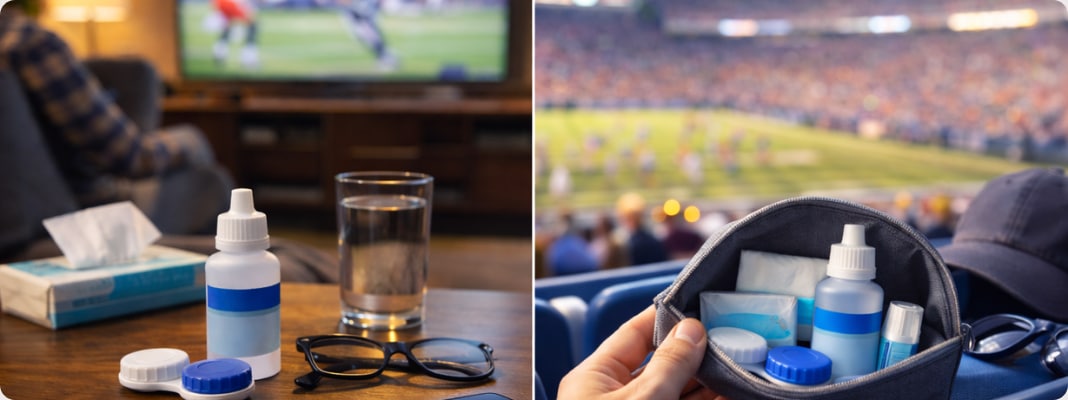
Bring glasses so you can switch quickly if your eyes feel irritated. Add approved contact lens rewetting drops, and for reusable lenses, include a small bottle of contact lens solution plus a clean case. Having backups prevents risky moves like rubbing your eyes or trying to force a lens to feel better.
5. Plan your no sleep rule before the party starts
If there is any chance you will nap, set a hard cut off time to remove your lenses and switch to glasses. Sleeping in lenses that are not approved for overnight wear increases the risk of irritation and infection. Keep your case and solution within reach so removing them is easy.
If there is any chance you will doze off, bookmark this: what happens if you sleep with contacts.
On Screen Contact Lens Safety Tips
Long screen stretches can make you blink less, which is a common reason contacts start to feel “off.” These tips help reduce eye strain and keep lenses comfortable from kickoff to the final whistle.
1. Use a simple blink reset during big moments
During commercials or timeouts, do 10 slow, complete blinks to recoat the lens and eye surface. Incomplete blinking is common during intense viewing and can worsen dryness. This quick reset is one of the easiest ways to improve contact lens comfort fast.
2. Follow a 20 minute break rhythm
Every 20 minutes, look at something far away for about 20 seconds to relax focusing muscles. This supports comfort when streaming sports on phones, tablets, or TVs for hours. Pair the look away with a few slow blinks for a better effect.
3. Control airflow in your viewing spot
Aim fans, heaters, and air conditioner vents away from your face so they do not dry the lens surface. Direct airflow speeds up tear evaporation and can trigger contact lens dryness even if you feel fine at first. If the room is dry, a humidifier can help, especially in winter or heated spaces.
If vents always make your lenses feel off, this quick read helps: why your eyes feel dry when the AC or heater is on.
4. Use contact safe drops the right way
If your eye doctor has approved it, use rewetting drops labeled safe for contact lenses, and avoid drops that are not meant for lens wear. Put in drops before discomfort builds rather than waiting until your eyes sting. If you need drops constantly, switch to glasses and reassess your lens choice with your eye doctor.
5. Keep snacks and hands from becoming a lens problem
Before touching your eyes, wash and dry hands again, especially after wings, chips, or sticky foods. Oils and spices can transfer from fingers to the lens and cause burning or blur. Good contact lens hygiene is the easiest way to avoid a preventable mid game issue.
Stadium Contact Lens Safety Tips
A stadium day adds wind, dry air, long lines, and fewer clean places to handle lenses. These tips keep contact lens safety simple and help you stay comfortable from gate entry to the walk back.
1. Pack a stadium safe contact lens kit
Bring backup glasses in a hard case so you can switch fast if your eyes feel irritated. Add approved contact lens rewetting drops, plus tissues and hand sanitizer for quick cleanups. If you wear reusable lenses, include travel size contact lens solution and a clean case in case you need to remove lenses.
2. Avoid handling lenses in crowded restrooms
Try not to remove or reinsert lenses unless you can wash and dry your hands properly with soap and water. Stadium restrooms can be busy, and “almost clean” hands raise the risk of irritation or infection. If a lens feels off and you cannot clean your hands well, switching to glasses is usually the safest move.
3. Protect your eyes from wind and bright light
Wind and outdoor air can make lenses feel dry faster, especially during long periods outside. Sunglasses can reduce squinting and help shield eyes from airflow, dust, and sun. If you feel dryness starting, use approved drops early rather than waiting until it feels gritty.
4. Keep food and drink residue away from your eyes
Stadium snacks often mean greasy fingers, spice, or sticky drinks on hands. Touching your eyes or lenses with food residue can cause stinging and blur right away. Wash hands before any eye contact, even if it is just “a quick adjustment.”
5. Set a comfort cutoff time for long event days
Stadium days often include travel, tailgates, and late nights, which can push wear time longer than usual. Plan ahead for when you will switch to glasses so you are not tempted to “push through” discomfort. If you feel sleepy on the way home, remove lenses first unless your lenses are specifically prescribed for overnight wear.
What to Do If Your Contacts Start Feeling Off Mid Game
Whether you are streaming sports at home or dealing with stadium wind, the goal is the same: fix the problem fast without making it worse. If your contact lens discomfort starts mid game, use this quick decision guide and keep your eyes the priority.
| What You Notice | Try This Now | Switch To Glasses When |
|---|---|---|
| Mild dryness or lens awareness | Do a blink reset, look away for 20 seconds, then use approved contact lens rewetting drops | The feeling returns every few minutes or keeps building |
| Gritty or scratchy feeling in one eye | Wash and dry hands, remove the lens, check for debris, and if reusable, rinse with fresh contact lens solution before cleaning | It still feels scratchy after reinserting or the lens looks torn or damaged |
| Blur that does not clear with blinking | Remove the lens and check if it is inside out or dirty, then switch to glasses while you troubleshoot | Vision stays blurry, or you notice worsening redness |
| Burning or stinging | Remove lenses and rest in glasses, then reassess after a short break | Burning is strong, does not settle, or comes with light sensitivity |
| Tight, tired feeling late in the game | Shorten wear time and switch to glasses, especially in dry indoor air or wind | Drops are not helping and your eyes feel increasingly irritated |
Safety Rule: Do not rub your eyes, and do not try to “power through” discomfort. If you are often dealing with contacts who feel dry while watching TV or long events, consider adjusting your routine next time with more breaks and a better prep plan.
Want a quick refresher to avoid common mistakes? Here’s how to clean contact lenses properly.
2026 Super Bowl LX On Screen and Stadium Comfort and Safety
If you want your eyes to feel good from kickoff to the final whistle, it really comes down to a few simple habits you can stick to. Do a quick pre game checklist, use better on screen viewing habits, pack a small stadium kit if you are going in person, and follow the watch party safety rules that keep lenses clean and comfortable. Keep the goal realistic: comfort should never mean pushing through pain.
Ready for contacts on screen or stadium? Shop contact lenses for comfort so you’re set for streaming, watch parties, or a full day in the stands.
Comfort and Safety FAQ for Super Bowl LX Lens Wearers
1. Are contact lenses safe for a long Super Bowl watch party?
They can be, as long as you follow basic contact lens hygiene and take breaks. If your eyes get irritated easily or you tend to nap on the couch, glasses may be the safer choice for part of the night.
2. How do I keep my contacts comfortable while watching on screen?
Screen time lowers blinking, which can trigger digital eye strain and make lenses feel dry. Use blink breaks, look away regularly, and keep rewetting drops approved for contact lenses nearby.
3. What should I not do with contacts during a party?
Do not rub your eyes with food on your hands, do not rinse lenses with tap water, and do not share drops or a lens case. These common mistakes can turn minor discomfort into a bigger problem.
4. Can I wear contacts to a stadium, and what should I bring?
Yes, many people do. Pack glasses, approved drops, and if you wear reusable lenses, a small bottle of contact lens solution and a clean case so you have a backup plan.
5. What if I get something in my eye at the stadium?
Avoid rubbing. If blinking and drops do not help, remove the lens only with clean, dry hands and switch to glasses. If the lens is a daily, discard it and use a fresh pair later.
6. Should I wear glasses instead of contacts for the whole game?
If you are prone to irritation, planning a long day out, or expect alcohol and might fall asleep, glasses can be the easiest win. You can also wear contacts for part of the day, then switch later for comfort and safety.
7. When is it not worth troubleshooting and I should stop wearing lenses?
Stop lens wear if you have sharp pain, worsening redness, discharge, strong light sensitivity, or vision changes that do not clear. Switch to glasses and get guidance from an eye doctor before wearing lenses again.
References
Official lineup of Super Bowl LX events and venues revealed. National Football League (NFL). https://www.nfl.com/news/official-lineup-of-super-bowl-lx-events-and-venues-revealed. Date Accessed February 5, 2026.
Niners’ Levi’s Stadium approved as site for Super Bowl LX in 2026. National Football League (NFL). https://www.nfl.com/news/49ers-levi-s-stadium-approved-as-host-site-for-super-bowl-lx-in-2026. Date Accessed February 5, 2026.
San Francisco Bay Area to Host Super Bowl LX In 2026. NFL Football Operations. https://operations.nfl.com/updates/the-game/san-francisco-bay-area-to-host-super-bowl-lx-in-2026. Date Accessed February 5, 2026.
About Contact Lenses. Centers for Disease Control and Prevention (CDC). https://www.cdc.gov/contact-lenses/about/index.html. Date Accessed February 5, 2026.
Hydrogen Peroxide Solution. U.S. Food and Drug Administration (FDA). https://www.fda.gov/medical-devices/contact-lenses/hydrogen-peroxide-solution. Date Accessed February 5, 2026.
Causes of Dry Eye. National Eye Institute (NEI), National Institutes of Health (NIH). https://www.nei.nih.gov/learn-about-eye-health/eye-conditions-and-diseases/dry-eye/causes-dry-eye. Date Accessed February 5, 2026.
Eye emergencies. MedlinePlus (NIH). https://medlineplus.gov/ency/article/000054.htm. Date Accessed February 5, 2026.
Related Articles
-
Contacts or Glasses in Snowy Conditions: What US Wearers Should Know This Winter
-
Weight Loss Drugs and Eye Stroke Risk (What Research Shows)
-

How to Transition from Glasses to Contact Lenses: A Beginner’s Guide
-

Glasses or Contact Lens for Glaucoma Patients: Which is Better?
-

Halloween Contact Lens Do’s and Don’ts Every Wearer Should Know